
Build Your Own "Greport" Script

This post is around Oracle EPM Cloud Planning.
Apologies for this neologism, that’s no more than the contraction of Groovy & Report. For those that would have some fondness for Unix, this has nothing to see with the “grep” command line, sorry! We will say that on Friday, everything is allowed 🙂
Well, now the oldests among us will know what lies behind the concept of a report script. For the newests, well… just know that it’s linked to one way of exporting data back in Essbase On-Premise. To make a long story short, this way of doing had 2 major pros:
- layout was configurable; understand that layout mean POV, rows, columns. You had the ability to choose which dimensions in which part of the report.
- aliases were possible to be chosen; see Essbase documentation on OUTALTNAMES or OUTALTSELECT if you feel some kind of nostalgia.
It had also one potential major drawback linked to the pros mentioned above: performance could be bad. Even really really bad. Understanding this will not be the purpose of this post, but it’s a story of dense and sparse dimensions towards the layout.
If you have some migration from On-Premise to Cloud Enterprise, this post might also be useful.
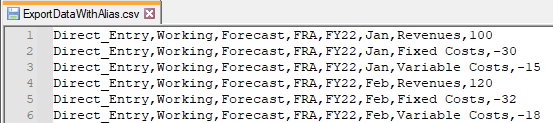
Objective will be to have the following outcome:
First step : one way of exporting using the csvWriter class
For those who have been following me already, you will be familiar with the way I am used to generate CSV or TXT files. You can find the available documentation here.
For now, I’ll be happy to extract data with codes only, like here:
// 0 - Initialisation
Cube cube = operation.application.getCube("VISION")
String povDataElement = "Direct_Entry"
String povScenario = "Forecast"
String povVersion = "Working"

String CurrentYear = operation.application.getSubstitutionVariable("CurrentYear").getValue()
String NextYear = operation.application.getSubstitutionVariable("NextYear").getValue()
def listOfYears = [CurrentYear,NextYear]

def listOfPeriods = 'Lvl0Descendants("YearTotalM")'

def listOfEntities = 'France'

def listOfAccounts = 'Lvl0Descendants("GP")'

def List<String> listOfEntitiesToExport = []
def List<String> listOfMonthsToExport = []
def List<String> listOfYearsToExport = []

// 1 - Create grid to read data on intersections
DataGridDefinitionBuilder DGDB_IntersectionWithDataToExport = cube.dataGridDefinitionBuilder()
DGDB_IntersectionWithDataToExport.addPov(['Data Element','Scenario','Version'],[[povDataElement],[povScenario],[povVersion]])
DGDB_IntersectionWithDataToExport.addColumn(['Accounts'], [[listOfAccounts]])
DGDB_IntersectionWithDataToExport.addRow(['Years','Period','Entity'], [listOfYears,[listOfPeriods],[listOfEntities]])

DGDB_IntersectionWithDataToExport.setSuppressMissingRows(true)
DataGridDefinition DGD_IntersectionWithDataToExport = DGDB_IntersectionWithDataToExport.build()
DataGrid DG_IntersectionWithDataToExport = cube.loadGrid(DGD_IntersectionWithDataToExport, false)

String yearCode, periodCode, entityCode, scenarioCode, versionCode, accountsCode, dataElementCode, dataAtIntersection
String accountsAlias

String ExportCSVFileNameCode = "ExportDataWithCode.csv"

// 2 - Create csv file with csvWriter class
println "[see in Application > Overview > Inbox/Outbox Explorer > $ExportCSVFileNameCode]\nCSV File (begin)"
csvWriter("$ExportCSVFileNameCode",',').withCloseable() { out ->
  DG_IntersectionWithDataToExport.dataCellIterator.each{
    // 6 Mandatory dimensions
    yearCode = it.getMemberName("Years")
    periodCode = it.getMemberName("Period")
    entityCode = it.getMemberName("Entity")
    scenarioCode = it.getMemberName("Scenario")
    versionCode = it.getMemberName("Version")
    accountsCode = it.getMemberName("Accounts")
    // 1 Custom dimension
    dataElementCode = it.getMemberName("Data Element")
    // Data to export at the intersection
    dataAtIntersection = it.getFormattedValue()

    out.writeNext dataElementCode, versionCode, scenarioCode, entityCode, yearCode, periodCode, accountsCode, dataAtIntersection

    println "$dataElementCode,$versionCode,$scenarioCode,$entityCode,$yearCode,$periodCode,$accountsCode,$dataAtIntersection"
  }
}
println "CSV File (end)\n"
“Export data with code in Accounts member names” Groovy rule
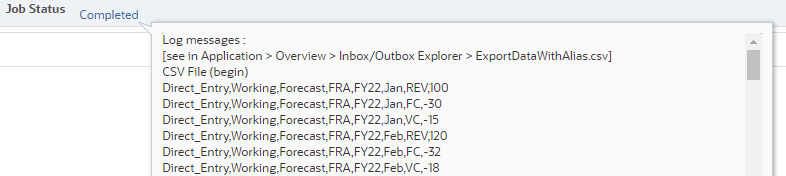
That would lead to the following logs in the Job console:
Second step : getting to read the alias
Groovy has the ability to read the member properties of any dimension member, so let’s use this piece of code to read about the Default alias table:
// Method to read alias of specified dimension
String getaliasDefault(String sDimension, String sCode)
{
  // Get the Entity dimension
  Dimension AccountsDim = operation.application.getDimension(sDimension)
  Member AccountsMbr = AccountsDim.getMember(sCode)
  def memberProps = AccountsMbr.toMap()
  String sAlias = memberProps["Alias: Default"]
  return sAlias
}
Now, combining with the code in the first step, the outcome would be that we do manage our alias to be exported:
Thanks to the following:
// 0 - Initialisation
Cube cube = operation.application.getCube("VISION")
String povDataElement = "Direct_Entry"
String povScenario = "Forecast"
String povVersion = "Working"

String CurrentYear = operation.application.getSubstitutionVariable("CurrentYear").getValue()
String NextYear = operation.application.getSubstitutionVariable("NextYear").getValue()
def listOfYears = [CurrentYear,NextYear]

def listOfPeriods = 'Lvl0Descendants("YearTotalM")'

def listOfEntities = 'France'

def listOfAccounts = 'Lvl0Descendants("GP")'

def List<String> listOfEntitiesToExport = []
def List<String> listOfMonthsToExport = []
def List<String> listOfYearsToExport = []

// 1 - Create grid to read data on intersections
DataGridDefinitionBuilder DGDB_IntersectionWithDataToExport = cube.dataGridDefinitionBuilder()
DGDB_IntersectionWithDataToExport.addPov(['Data Element','Scenario','Version'],[[povDataElement],[povScenario],[povVersion]])
DGDB_IntersectionWithDataToExport.addColumn(['Accounts'], [[listOfAccounts]])
DGDB_IntersectionWithDataToExport.addRow(['Years','Period','Entity'], [listOfYears,[listOfPeriods],[listOfEntities]])

DGDB_IntersectionWithDataToExport.setSuppressMissingRows(true)
DataGridDefinition DGD_IntersectionWithDataToExport = DGDB_IntersectionWithDataToExport.build()
DataGrid DG_IntersectionWithDataToExport = cube.loadGrid(DGD_IntersectionWithDataToExport, false)

String yearCode, periodCode, entityCode, scenarioCode, versionCode, accountsCode, dataElementCode, dataAtIntersection
String accountsAlias

String ExportCSVFileNameAlias = "ExportDataWithAlias.csv"

// 2 - Create csv file with csvWriter class
println "[see in Application > Overview > Inbox/Outbox Explorer > $ExportCSVFileNameAlias]\nCSV File (begin)"
csvWriter("$ExportCSVFileNameAlias",',').withCloseable() { out ->
  DG_IntersectionWithDataToExport.dataCellIterator.each{
    // 6 Mandatory dimensions
    yearCode = it.getMemberName("Years")
    periodCode = it.getMemberName("Period")
    entityCode = it.getMemberName("Entity")
    scenarioCode = it.getMemberName("Scenario")
    versionCode = it.getMemberName("Version")
    accountsCode = it.getMemberName("Accounts")
    // 1 Custom dimension
    dataElementCode = it.getMemberName("Data Element")
    // Data to export at the intersection
    dataAtIntersection = it.getFormattedValue()
    // Converting code to alias
    accountsAlias = getaliasDefault("Accounts", accountsCode)

    out.writeNext dataElementCode, versionCode, scenarioCode, entityCode, yearCode, periodCode, accountsAlias, dataAtIntersection

    print "$dataElementCode,$versionCode,$scenarioCode,$entityCode,$yearCode,$periodCode,$accountsCode,$dataAtIntersection"
    println "\t|\t$dataElementCode,$versionCode,$scenarioCode,$entityCode,$yearCode,$periodCode,$accountsAlias,$dataAtIntersection"
  }
}
println "CSV File (end)\n"

// Method to read alias of specified dimension
String getaliasDefault(String sDimension, String sCode)
{
  // Get the Entity dimension
  Dimension AccountsDim = operation.application.getDimension(sDimension)
  Member AccountsMbr = AccountsDim.getMember(sCode)
  def memberProps = AccountsMbr.toMap()
  String sAlias = memberProps["Alias: Default"]
  return sAlias
}
“Export data with alias in Accounts member names” Groovy rule.
Third step : managing the case when the alias is empty
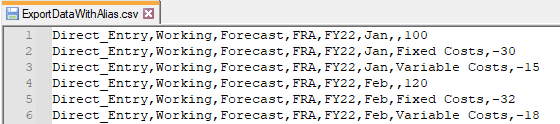
Yes, you might have already seen that if alias was empty, then it would result in that kind of result:
To manage this case, I would simply add a slight change at the end of the getaliasDefault method:
// Method to read alias of specified dimension
String getaliasDefault(String sDimension, String sCode)
{
  // Get the Entity dimension
  Dimension AccountsDim = operation.application.getDimension(sDimension)
  Member AccountsMbr = AccountsDim.getMember(sCode)
  def memberProps = AccountsMbr.toMap()
  String sAlias = memberProps["Alias: Default"]
  if (sAlias)
    return sAlias
  else
    return sCode
}
“Export data with alias in Accounts member names” Groovy rule. If no alias defined, the member code is used
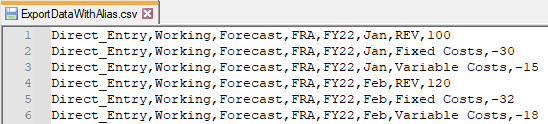
This would lead to the following outcome:
Of course, depending (as always) on what you would like to achieve, this should be adapted to suit your needs (which are the needs of your customer ultimately). One could prevent the file to be generated in case at least one alias is missing. Or you may also want to get aliases on other dimension members…
Well. That’s possible now. And yet, another seed that may grow your EPM dreams…